AWS DevOps step-by-step CI/CD pipeline implementation helps teams automate code integration, testing, and deployment using managed cloud services. In this guide, you’ll learn how to build an AWS DevOps step-by-step CI/CD pipeline using core services from Amazon Web Services, enabling faster releases, improved reliability, and better collaboration between development and operations teams.
This tutorial is beginner-friendly yet aligned with real-world DevOps practices used in production environments.
Table of Contents
What Is an AWS DevOps CI/CD Pipeline?
An AWS DevOps CI/CD pipeline is an automated workflow that continuously integrates code changes, runs builds and tests, and deploys applications using AWS-managed DevOps services. CI/CD pipelines reduce manual effort, minimize errors, and accelerate software delivery. 
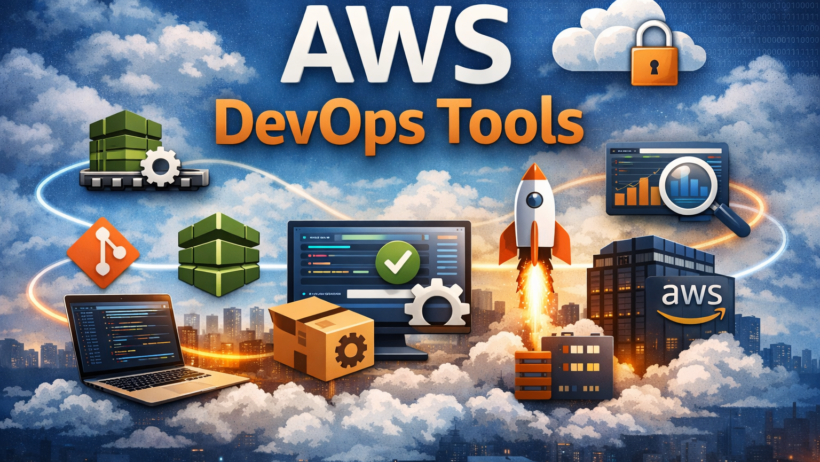
In AWS, CI/CD pipelines are commonly built using:
- AWS CodeCommit (source control)
- AWS CodeBuild (build and test)
- AWS CodeDeploy (deployment)
- AWS CodePipeline (orchestration)
Why Use ?
AWS is a popular choice for DevOps because it provides deeply integrated, scalable, and fully managed services.
Key Benefits
- Integrated Toolchain
AWS DevOps services work seamlessly together without third-party tooling. - Scalability & Cost Efficiency
Pay only for what you use and scale automatically. - Infrastructure as Code (IaC)
Manage infrastructure using CloudFormation or AWS CDK. - Managed Services
No need to manage servers for CI/CD tools.
What We’ll Build in This Guide
We’ll create that automatically:
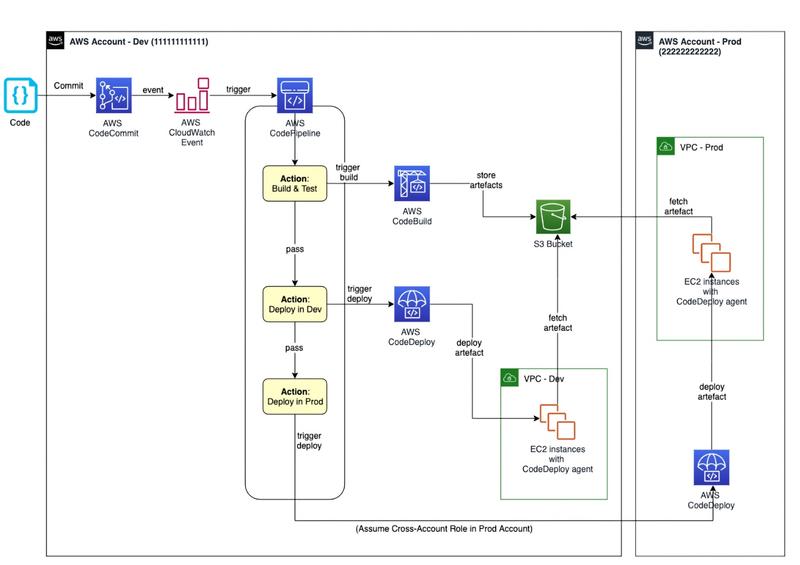
- Pulls source code from AWS CodeCommit
- Builds and tests the application using AWS CodeBuild
- Deploys the application to an EC2 instance using AWS CodeDeploy
- Orchestrates the workflow using AWS CodePipeline
Pipeline Flow:
CodeCommit → CodePipeline → CodeBuild → CodeDeploy → EC2
Prerequisites
Before starting, make sure you have:
- An AWS account
- An IAM user with sufficient permissions
- Git installed locally
- A sample application (Node.js, Python, or static site)
- (Optional) An EC2 instance with the CodeDeploy agent installed
Step 1: Set Up Source Control with AWS CodeCommit
AWS CodeCommit is a fully managed Git-based repository service.
Steps
- Open the AWS Console → CodeCommit
- Create a repository (e.g.,
my-devops-app) - Configure HTTPS or SSH credentials
- Clone the repository locally
- Add your application code
- Commit and push to the main branch
Your code is now securely stored in AWS.
Step 2: Build and Test with AWS CodeBuild
AWS CodeBuild compiles source code, runs tests, and creates deployable artifacts.
Create buildspec.yml
version: 0.2

phases:
  install:
    runtime-versions:
      nodejs: 18
    commands:
      - npm install
  build:
    commands:
      - npm test || echo "No tests configured"
artifacts:
  files:
    - '**/*'
Commit and push the file to CodeCommit.
Create a CodeBuild Project
- Source: CodeCommit
- Environment: Managed image
- Buildspec: Use
buildspec.yml - Artifacts: Store in S3
Step 3: Deploy with AWS CodeDeploy
AWS CodeDeploy automates deployments to EC2 instances.
Create appspec.yml
version: 0.0
os: linux
files:
  - source: /
    destination: /var/www/html
hooks:
  ApplicationStart:
    - location: scripts/start_server.sh
      timeout: 300
      runas: root
Ensure your EC2 instance:
- Has the CodeDeploy agent installed
- Is tagged correctly for deployment targeting
Step 4: Orchestrate with AWS CodePipeline
AWS CodePipeline connects all stages into a single automated workflow.
Pipeline Stages
- Source: AWS CodeCommit
- Build: AWS CodeBuild
- Deploy: AWS CodeDeploy
Once created, the pipeline runs automatically on every code push.
Step 5: Infrastructure as Code (Best Practice)
In production, CI/CD infrastructure should be defined as code.
Why Use IaC?
- Consistent environments
- Version-controlled infrastructure
- Faster disaster recovery
Recommended tools:
- AWS CloudFormation
- AWS CDK
Step 6: Monitoring with AWS CloudWatch
Monitoring ensures reliability and faster troubleshooting.
Monitor:
- CodeBuild and CodeDeploy logs
- Pipeline execution history
- EC2 metrics and alarms
CloudWatch provides centralized observability for your AWS DevOps pipeline.
Conclusion
You’ve successfully built an AWS DevOps step-by-step CI/CD pipeline using managed AWS services. This pipeline automates source control, builds, testing, and deployment—laying a strong foundation for modern DevOps practices.
What to Explore Next
- Blue/Green deployments
- Containers with ECS or EKS
- Serverless CI/CD with Lambda
- Security scanning in pipelines
- Full automation using IaC
Frequently Asked Questions (FAQ)
What is an AWS DevOps step-by-step CI/CD pipeline?
An AWS DevOps step-by-step CI/CD pipeline is an automated workflow that integrates, builds, tests, and deploys applications using AWS DevOps services.
Which AWS services are used for CI/CD?
Common services include AWS CodeCommit, CodeBuild, CodeDeploy, and CodePipeline.
Is AWS CI/CD suitable for beginners?
Yes. AWS provides managed services and console-based setup, making it beginner-friendly.
Do I need EC2 for AWS CI/CD?
Not always. CI/CD pipelines can also deploy to Lambda, ECS, or EKS depending on the application.
Is AWS DevOps used in production?
Yes. AWS DevOps tools are widely used in enterprise and startup production environments.
💬 Community Question
Which AWS DevOps tools or practices have you found most effective in real-world projects? Share your experience in the comments below.